



Flying Ball
5
Wave Dash
5
Gravity Flip Runner
5

Subway Runner
5

Geometry Dash Wave
4.2

Among Us
4.2

Geometry Dash 2.2
5
Space Waves
3.8
Geometry Dash Lite

















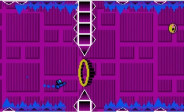








Why We Love Geometry Dash Lite: A Survival Guide
Let’s be real: Geometry Dash Lite is a nightmare dressed like a neon dream. It’s a rhythm-based platformer that doesn't care about your feelings. One wrong tap, one millisecond of lag, and—boom—back to 0%. It’s frustrating, but the adrenaline rush when you finally sync with the beat is unmatched. Whether you’re on the official app or killing time with Geometry Dash Lite Unblocked at school, here is how you actually survive the chaos.
1. Master the Controls: How to Move
The one-tap controls are "simple," but each vehicle is a different beast:
- The Cube: Your basic jumper. Don't just spam taps; hold to "buffer" your next jump.
- The Ship: Forget everything you know about gravity. Hold to fly up, release to fall. It's all about steady pulses.
- The Ball: Tapping doesn't make you jump; it switches gravity, flipping you between the floor and the ceiling.
- The UFO: Think Flappy Bird. Each tap gives a mid-air hop. Perfect timing and reflexes are non-negotiable here.
2. Essential Tips and Tricks for Beginners
Stop trying to "sight-read" every level. You won't win that way.
- Muscle Memory is King: Your brain might freeze, but your fingers won't. Play until the jumps become second nature.
- Listen to the Beat: The music isn't just background noise; it’s your GPS. Every obstacle is baked into the soundtrack.
- Use Practice Mode: Seriously. Use those green checkpoints. It’s better to fail 100 times in practice than to rage-quit in a Normal Mode run.
3. Playing Geometry Dash Lite Unblocked
We’ve all been there—stuck behind a school firewall with nothing to do. Searching for Geometry Dash Lite Unblocked is the classic move for a quick fix on a Chromebook. It’s the same brutal game, browser-based. Just make sure your keyboard doesn't have lag, or those triple spikes will be your downfall.
Frequently Asked Questions (FAQs)
Q1: Is there a difference between the Lite version and the full game?
- A: Yes. The Lite version is a free Geometry Dash Lite guide to the main game. You get core levels and the Icon Kit, but you miss out on the level editor and the Wave mode.
Q2: How do I beat the "Demon" levels?
- A: Lite has "Clubstep." To beat it, you need to master portals and gravity-flip transitions in Practice Mode until you stop panicking at 90%.
Q3: How do I get more skins?
- A: Hunt for Secret Coins. They’re usually tucked away in the most annoying spots, but that’s how you unlock cool icons to show off your skills.












Discuss: Geometry Dash Lite